

Don't fall for the calendar scam: protect yourself against malware on iPhone
Today, we address a topic that has bothered many people: the famous "iPhone calendar virus." Despite the name, it's not exactly a virus, but rather spam that adds fake calendars to our Apple devices, such as iPhones, MacBooks, and iPads. The result is notifications with fake events that contain suspicious or malicious links.

These notifications are designed to provoke curiosity and a sense of urgency, making us want to click and see what is being promoted. However, clicking these links can lead to malware on your device or phishing pages, which is why it is important not to click on the links and avoid responding to events by clicking accept, decline, or maybe.
On iPhones, the default settings allow receiving invitations from anyone, even if they are not in our contact list, which facilitates spam entering our calendar. Any iPhone user can be surprised by these strange calendar events, which originate from a combination of social engineering and malicious code by hackers.
What is the origin of these threats?
1. Accidentally clicking a malicious link on suspicious sites, which may be disguised as captchas;
2. Receiving and clicking a spam link via text message, commonly disguised as fake order tracking.
It is important to understand that anyone with our email address can send fake invitations with infected links.
Some important steps to avoid these situations:
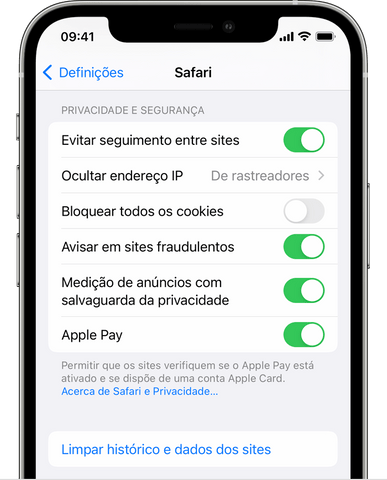
1. Block pop-ups in Safari: on iPhone or iPad, go to Settings > Safari, enable "Block Pop-ups" and "Fraudulent Website Warning." On Mac, these options are in Safari > Preferences;
2. Avoid clicking on unknown links or opening attachments in suspicious text messages or emails;
3. Change calendar settings: disable spam notifications and do not automatically accept invitations;
4. Avoid sharing your email: before giving your email address to someone, consider creating a secondary (or "burner") email to share, which is not linked to the main account. This way, spam goes to this "burner" and does not interfere with daily emails.
By following these tips, the risk of malware in your iPhone calendar can be significantly reduced. It is important to remain vigilant and aware of threats to your device's security and take the necessary steps to protect it against spam and malware. The best way to combat these threats is through prevention and education on digital security.